
Struts 2 ModelDriven Example

In this tutorial we gonna talk a bit about Struts suppport for model objects. The Model object is a pakage of information that needs to be sent between different layers of the application. For example for from your view to business layer or from business layer to data layer. To create a ModelDriven Action our Action class should implement the ModelDriven interface and should include the modelDriven interceptor. The modelDriven interceptor is already included in the default stack.
The next step is to implement the getModel() method in such a way that it returns the application domain object, in our example we return the UserDetails object.
Let see this through an example

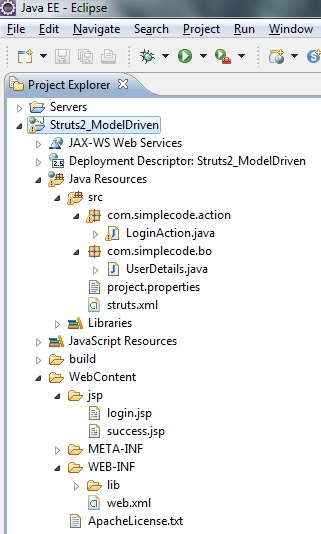
1. Folder Structure
2. Bean Class(Model Class)
Now referring to the previous example , the data members userName , password and and its getter and setter method are moved into separate class as shown below.
File : UserDetails.java
package com.simplecode.bo;

public class UserDetails {

	private String userName;
	private String password;

	public String getUserName() {
		return userName;
	}

	public void setUserName(String userName) {
		this.userName = userName;
	}

	public String getPassword() {
		return password;
	}

	public void setPassword(String password) {
		this.password = password;
	}

}
3. Action Class
Action class implements the ModelDriven interface, declared the getModel() method to return the userDetails’s object. When the form data is submitted to this action, it will transfers the form data into the userDetail properties automatically.
File : LoginAction.java
package com.simplecode.action;

import com.opensymphony.xwork2.ActionSupport;
import com.opensymphony.xwork2.ModelDriven;
import com.simplecode.bo.UserDetails;

public class LoginAction extends ActionSupport implements ModelDriven {

	private static final long serialVersionUID = 6677091252031583948L;

	// Need to Initiize a mordel driven object
	UserDetails userdetails = new UserDetails();

	public UserDetails getUserdetails() {
		return userdetails;
	}

	public void setUserdetails(UserDetails userdetails) {
		this.userdetails = userdetails;
	}

	public String execute() {

		return SUCCESS;
	}

	public void validate() {
		if (userdetails.getUserName().equalsIgnoreCase("simplecode")
				&& userdetails.getPassword().equals("struts2")) {
			addActionMessage("Welcome " + userdetails.getUserName()
					+ ", you are logged in successfully !");
		} else {
			addActionError("Login failed,"
          + "Enter user name as simplecode and password as struts2");
		}
	}

	// Modern Deiven class implemented Method
	public UserDetails getModel() {
		return userdetails;
	}
}
4. Property file
project.properties
project.username = Username
project.password = Password
project.submit = Login
5. JSP page
JSP pages for the ModelDriven demonstration.
login.jsp
<%@ page language="java" contentType="text/html; charset=ISO-8859-1"
	pageEncoding="ISO-8859-1"%>
<!DOCTYPE html PUBLIC "-//W3C//DTD HTML 4.01 Transitional//EN"
"http://www.w3.org/TR/html4/loose.dtd">
<%@taglib uri="/struts-tags" prefix="s"%>
<html>
<head>
<meta http-equiv="Content-Type" content="text/html; charset=ISO-8859-1">
<title>Login</title>
</head>
<body>
	<h3>Struts 2 ModelDriven Example</h3>
	<s:if test="hasActionErrors()">

		<div class="errors">
			<br />
			<s:actionerror />
		</div>
	</s:if>

	<s:form action="welcome">
		<s:textfield name="userName" key="project.username" />
		<s:password name="password" key="project.password" />
		<s:submit key="project.submit" name="submit" />
	</s:form>
</body>
</html>
success.jsp
<%@ page language="java" contentType="text/html; charset=ISO-8859-1"
	pageEncoding="ISO-8859-1"%>
<%@ taglib prefix="s" uri="/struts-tags"%>
<html>
<head>
<title>Welcome Page</title>
</head>

<body>
<h3>Struts 2 ModelDriven Example</h3>

	<s:if test="hasActionMessages()">
		<div class="welcome">
		<br/>
			<s:actionmessage />
		</div>
	</s:if>

</body>
</html>
6. struts.xml
<struts>

  <constant name="struts.custom.i18n.resources" value="project" />
	<package name="default" extends="struts-default" namespace="/jsp">
	<action name="Login">
			<result>/jsp/login.jsp</result>
		</action>
		<action name="welcome" class="com.simplecode.action.LoginAction">
			<result name="success">/jsp/success.jsp</result>
			<result name="input">/jsp/login.jsp</result>
		</action>
	</package>
</struts>
7. Demo
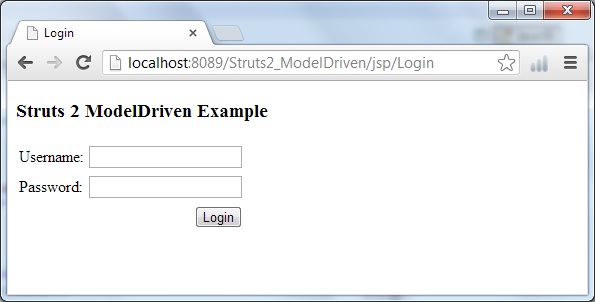
http://localhost:8089/Struts2_ModelDriven/
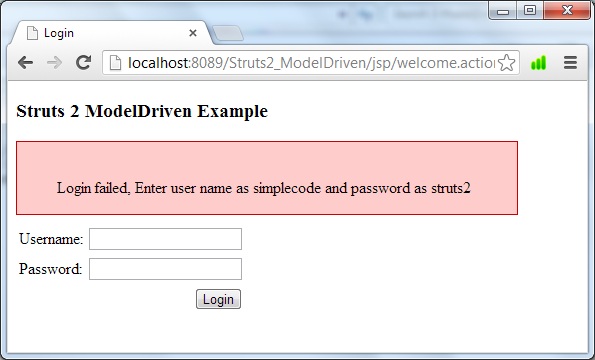
When Username and password is invalid, display error message with <s:actionerror/>
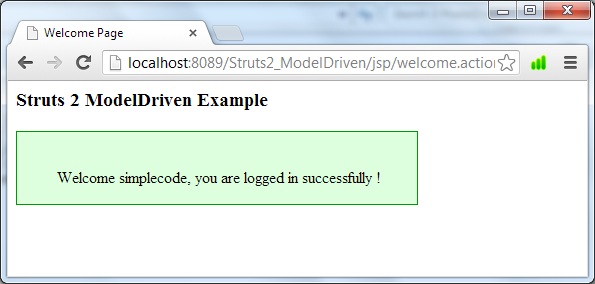
When Username and password is valid, display welcome message <s:actionmessage/>
Reference

About Jamil




Take Your Business Globally !!

Need a Website?